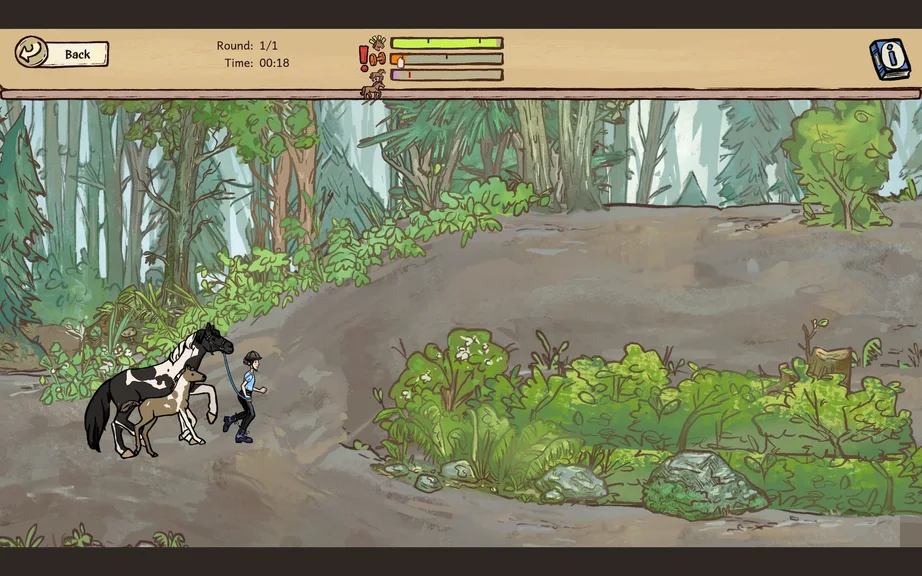
In Horses of Hoofprint Bay, I can edit my save file to change a horse’s personality traits or adjust the amount of money I have. In this guide, I’ll show you where I find my save files, how I edit horse personality values, and how I change my money. I’ll also explain the important consequences of modifying a save file before getting started.
How to Edit Horse Personalities in Horses of Hoofprint Bay Save Files
Editing a save file in Horses of Hoofprint Bay is fairly straightforward once I know where to look. I can open the save file in Notepad, find the horse I want to modify, and change its personality using a numerical value. The same file also contains the money value for my stable.
Important Warnings Before Editing
Before I make any changes, there are a few things worth knowing:
- Editing a save file disables achievements and statistics. If I want to continue earning achievements on a particular save, I should leave that file untouched.
- I recommend backing up the save file. This is especially important when changing values directly in the game’s files.
- This guide only covers editing existing personality traits. I won’t be adding new quirks, since modifying those entries incorrectly could cause problems with the horse or the save file.
Adding quirks may be possible by copying the relevant code from a horse with multiple traits and adjusting it for another horse. However, I prefer not to risk making those changes here.
How to Find Your Save File
First, I need to locate the Horses of Hoofprint Bay save folder. The easiest way I found is through the Windows search bar.
- Type %appdata% into the Windows taskbar search bar and open the folder.
- In File Explorer, click AppData in the address bar to go back one folder.
- Open the LocalLow folder and scroll down until you find ThogliStudios.
- Open Horses of Hoofprint Bay, then Saves~, followed by Games.
- Select the folder named after the save game I want to edit.
Alternative: Finding the Save Folder Manually
If I don’t want to use the Windows search bar, I can navigate directly to the save folder using this path:
C:\Users\(your user)\AppData\LocalLow\ThogliStudios\Horses of Hoofprint Bay\Saves~\Games\(save file name)
One thing to remember is that AppData is a hidden folder. If I can’t see it in File Explorer, I go to View > Show > Hidden Items and enable that option.
How to Edit Horse Personality Traits
Once I’m inside the correct save folder, I’ll see several JSON files. Some are numbered backups from previous in-game days, but the one I need is simply named save, without any number attached.
This is the file that affects my current game. I can open it using a text editor such as Notepad.
Finding the Horse I Want to Edit
With the save file open, I press Ctrl + F to bring up the search bar. Then I enter the name of the horse whose personality I want to change and press Enter.
This takes me to that horse’s information in the save file. Although there are plenty of other values here, I’m only interested in the personality section for now.
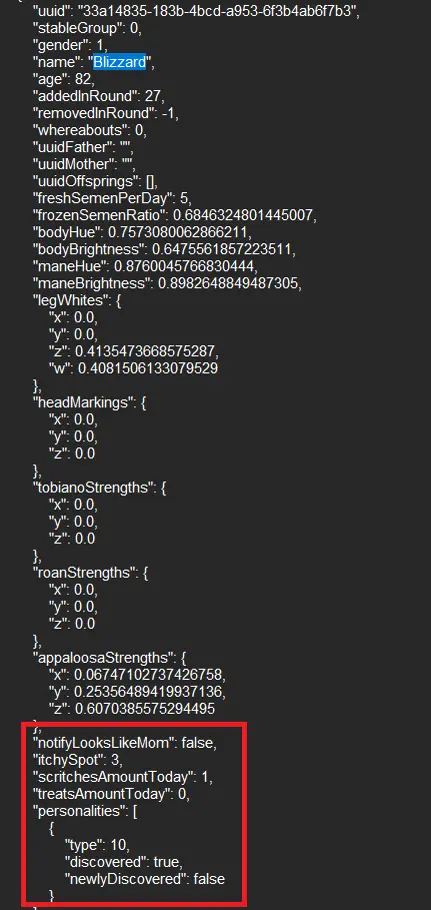
I scroll through the horse’s information until I find the personality entry shown in the image below. The specific number I need to edit is the value next to “type”.
Understanding Horse Personality IDs
The personality system can be a little confusing because the values in the save file don’t match the positions in the in-game Traits and Quirks book exactly.
Each personality uses a numerical ID that starts at 0 instead of 1. This means I need to enter a number one lower than the trait’s position in the book.
For example, Good Inheritance appears as the 10th trait in the book, but its save file value is 9. Entering 10 would select Bad Inheritance instead.
All Horse Personality IDs and Effects
Here is the complete list of horse personality values I can use when editing the save file in Horses of Hoofprint Bay:
- 0 – Easy Keeper: Needs less food, gains 10 body condition, and loses weight more slowly.
- 1 – Hard Keeper: Needs more food, loses 10 body condition, and loses weight faster.
- 2 – Snacky: Gains more confidence from treats.
- 3 – Cuddly: Gains more confidence from scritches.
- 4 – Neat Freak: Starts each day with less dirt.
- 5 – Mud Lover: Starts each day with more dirt.
- 6 – Sure Footed: Has a lower chance of injury and can only receive abrasions while in the field.
- 7 – Injury Prone: Has a higher chance of injury and can suffer more serious injuries in the field.
- 8 – Good Mom: Foals mothered by this mare begin with higher stats and confidence.
- 9 – Good Inheritance: Makes the horse’s foal more likely to have better stats than its parents.
- 10 – Bad Inheritance: Makes the horse’s foal more likely to have worse stats than its parents.
- 11 – Rebellious: May randomly attempt to change gait even at maximum confidence.
- 12 – Energetic: May still try to speed up at maximum confidence and requires more exercise.
- 13 – Chill: May still try to slow down at maximum confidence and requires less exercise.
It’s also worth noting that my starter horse is always a mare with Sure Footed and Good Mom. These starting traits help prevent serious field injuries early on and make it easier to begin breeding.
Saving the Personality Changes
After choosing the personality I want, I replace the number next to “type” with its corresponding ID from the list above.
Once I’m finished, I save the file, close Notepad, and launch Horses of Hoofprint Bay again. The horse should now have the personality I selected.
Bonus: How to Edit Money in Horses of Hoofprint Bay
Since I’m already editing my save file, I can also change the amount of money available in my game. This uses the same save file I opened for the personality changes.
Finding and Changing the Money Value
Here’s how I locate and edit my money:
- Open the save file in Notepad and press Ctrl + F.
- Search for money, then use the down arrow twice starting from the top of the file.
- Find the money value located just below the name of my yard or stable.
- Replace the existing value with the amount I want. I can simply add a couple of zeros to increase it.
- Save the file and launch the game to see the updated amount.
What Happens After Editing a Save File?
After I save my modifications and return to the game, the edited save will display a red ribbon on the file selection screen. This indicates that achievements and statistics have been disabled for that save.
That’s the main trade-off I need to consider before changing personality traits or money. If I still want to earn achievements and track statistics normally, I should avoid editing that save file.
And that’s how I edit horse personalities and money in Horses of Hoofprint Bay. Happy ranching!